
API Key Authentication
Simple and secure API access using API Keys for corporate clients
Getting Your API Key
Step 1: Request API Key
Contact our team through the Contact Us page to request API access. Provide your company details and integration requirements. Our admin team will review your request and generate a unique API key for your organization.
Contact Us for API AccessWhat You'll Receive
- API Key Token (ApiKey prefix)
- Sandbox Environment Access
- Production Environment Access
- Postman Collection Access
- Technical Documentation
Timeline
- API Key Generation: 1-2 business days
- Sandbox Access: Immediate after API key generation
- Production Access: After successful testing
How to Use Your API Key
Add API Key to Request Header
Include your API key in the Authorization header with "ApiKey" prefix for all API requests
Authorization: ApiKey YOUR_API_KEY_HEREMake API Request
Use the API key in all your requests to create orders, track deliveries, and access other API endpoints
GET {{base_url}}/api/master/governances/ar
                                    Host: https://api.albattadelivery.com
Authorization: ApiKey YOUR_API_KEYReceive Response
Get instant JSON responses with order details, tracking information, and status updates
{
                                        "responseCode": 200,
                                        "message": "Success",
                                        "results": [
                                        {
                                        "governanceId": 1,
                                        "governanceName": "العاصمة"
                                        },
                                        {
                                        "governanceId": 2,
                                        "governanceName": "حولي"
                                        }
                                        ]
                                        }
Base URLs
https://dev.api.albattadelivery.com
Use for development and testing
https://api.albattadelivery.com
Use for production traffic
Setting Up Postman
Import Collection
Download and import the Postman collection from the Introduction page
![[Screenshot: Import Collection]](/images/api-docs/import-collection.jpg)
Set API Key
Add your API key to the Postman environment variable. Make sure to include the "ApiKey" prefix
base_url: https://api.albattadelivery.com
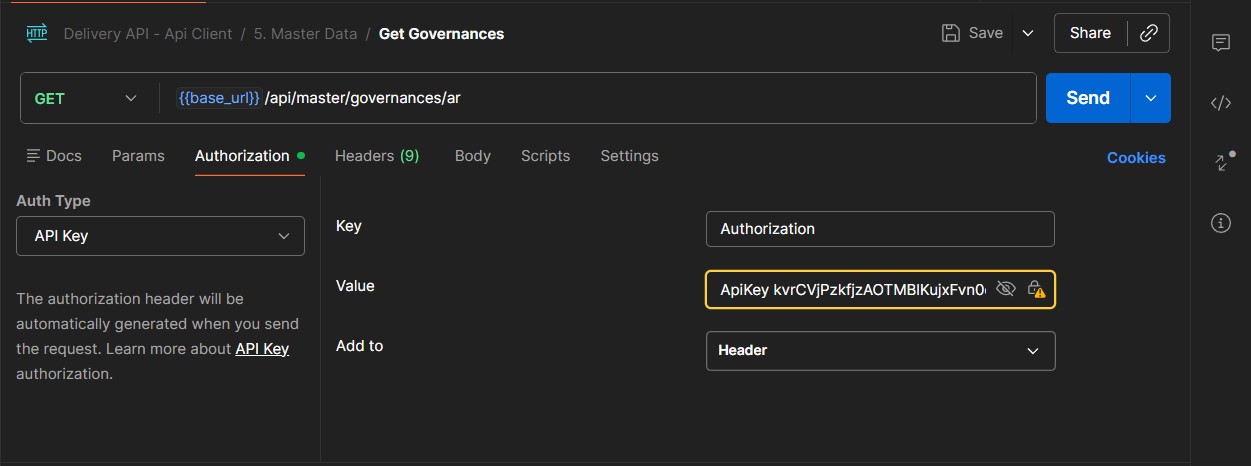
api_key: ApiKey YOUR_KEYConfigure Authorization
n Postman, select "API Key" as Auth Type, set Key to "Authorization" and Value to your API key with prefix
Test Your First Request
Try creating a test order in sandbox environment
![[Screenshot: First API Call]](/images/api-docs/first-request.jpg)
Code Examples
# Get Governances with API Key
                                                    curl -X GET https://api.albattadelivery.com/api/master/governances/ar \
                                                    -H "Authorization: ApiKey YOUR_API_KEY"

                                                    # Create Order with API Key
                                                    curl -X POST https://api.albattadelivery.com/api/orders/create \
                                                    -H "Content-Type: application/json" \
                                                    -H "Authorization: ApiKey YOUR_API_KEY" \
                                                    -d '{
                                                    "sender": {
                                                    "name": "Your Company",
                                                    "phone": "+965 12345678",
                                                    "address": "Kuwait City"
                                                    },
                                                    "receiver": {
                                                    "name": "Customer",
                                                    "phone": "+965 87654321",
                                                    "address": "Salmiya"
                                                    }
}'const apiKey = 'ApiKey YOUR_API_KEY';
const baseUrl = 'https://api.albattadelivery.com';
async function getGovernances() {
const response = await fetch(`${baseUrl}/api/master/governances/ar`, {
method: 'GET',
headers: {
'Authorization': apiKey
}
});
return await response.json();
}
async function createOrder(orderData) {
const response = await fetch(`${baseUrl}/api/orders/create`, {
method: 'POST',
headers: {
'Content-Type': 'application/json',
'Authorization': apiKey
},
body: JSON.stringify(orderData)
});
return await response.json();
}public class AlbattaApiClient
{
private readonly HttpClient _httpClient;
private readonly string _apiKey;
private readonly string _baseUrl;
public AlbattaApiClient(string apiKey, bool useSandbox = false)
{
_apiKey = apiKey.StartsWith("ApiKey ") ? apiKey : $"ApiKey {apiKey}";
_baseUrl = useSandbox
? "https://api.test.albattadelivery.com"
: "https://api.albattadelivery.com";
_httpClient = new HttpClient();
_httpClient.DefaultRequestHeaders.Authorization =
new AuthenticationHeaderValue("ApiKey", apiKey.Replace("ApiKey ", ""));
}
public async Task<GovernanceResponse> GetGovernancesAsync()
{
var response = await _httpClient.GetAsync(
$"{_baseUrl}/api/master/governances/ar"
);
return await response.Content
.ReadFromJsonAsync<GovernanceResponse>();
}
public async Task<OrderResponse> CreateOrderAsync(CreateOrderRequest request)
{
var response = await _httpClient.PostAsJsonAsync(
$"{_baseUrl}/api/orders/create",
request
);
return await response.Content
.ReadFromJsonAsync<OrderResponse>();
}
}Access tokens expire after 1 hour - implement token refresh logic
- Never share your API key publicly or commit it to version control
- Store your API key in environment variables, not in code
- Always use HTTPS in production environments
- Test thoroughly in sandbox before going to production
- All API requests require a valid API key in the Authorization header with "ApiKey" prefix
Need Help?
Our technical support team is available to assist you with integration. Contact us at support@albattadelivery.com